Everything you need to use the ManageMango reseller panel confidently — login, topping up credit, renewing a device, the payment-password trick, and what to do when things go wrong. Covers desktop web, mobile PWA, and the Android app.
There are two surfaces — same account, same credit balance
ManageMango is run by CoinMango. Your single reseller username works on both surfaces below, and your balance and order history are shared between them. Use whichever is more convenient — most sellers keep the mobile app open all day and fall back to desktop for bulk operations or exporting receipts.
desktop_windows Desktop web panel
managemango.org
Full feature set. Best for bulk renewals, exporting transaction history, and reading long receipt lists. Open in any modern browser (Chrome, Edge, Firefox, Safari).
smartphone Mobile app / PWA
app.wallet.metamango.org
The recommended surface on phones. Open the link in Chrome / Safari and tap Add to Home Screen to use it like a native app. An Android APK build ("MetaMango Wallet") is also available.
Your balance is one number. If you top up on desktop, you can renew on mobile 10 seconds later. There's no syncing step.
workspaces
2. Account Types — Reseller vs Sub-Dealer
1
Two tiers, same Mango prices
We open two kinds of ManageMango account for partners:
Tier
What you can do
Profits Settlement minimum
Reseller
Renew devices for your own buyers. You cannot open accounts for other resellers.
5 Mango / month
Sub-Dealer
Renew devices and open reseller accounts under you — build your own downline.
120 Mango / month
Renewal prices are identical for both tiers. The only difference is the account-creation permission and the monthly profits-settlement threshold (see section 12). Pick based on whether you plan to recruit your own sellers.
key
3. Getting Your Account
2
Message me on Telegram — I create the account manually
I'll create the account with your chosen username and password — usually within a few hours during business hours — then send you a confirmation on Telegram.
Two requirements before I open an account:
You need to be actively selling to roughly 50 customers or more. A Mango reseller panel is a long-term commitment on our side and only pays off for sellers with real volume — not a sign-up for someone renewing their own 1–2 boxes.
Your first Mango top-up is $50 minimum (USDT or Binance Pay only — see section 7). No exceptions for the first buy; after that you can top up any amount.
If you're below 50 customers today but growing, start as a RENEW-FOREVER Marketplace seller first — once your volume's there, move up to your own Mango panel.
3
Set your 6-digit payment password on first login
The very first time you log into managemango.org or the mobile app, the panel will prompt you to set a 6-digit payment password. This is separate from your login password and protects every spend action (renewals, transfers).
Pick 6 digits you'll remember — or better, generate them and save to a password manager.
Confirm by re-typing.
The panel accepts it; there's no email confirmation step.
Critical: once set, the 6-digit payment password cannot be retrieved or reset — not by you, not by me, not by ManageMango support. The panel doesn't store it in a recoverable form. If you forget it, your wallet balance is frozen. Write it down the moment you set it.
4
Pay for your first top-up, I credit your Mango balance
Once your 6-digit payment password is set, send me payment (USDT or Binance Pay — see section 7). I'll credit your Mango balance manually. After that, you can renew devices and run checks freely.
login
4. First Login
2
Sign in at managemango.org or app.wallet.metamango.org
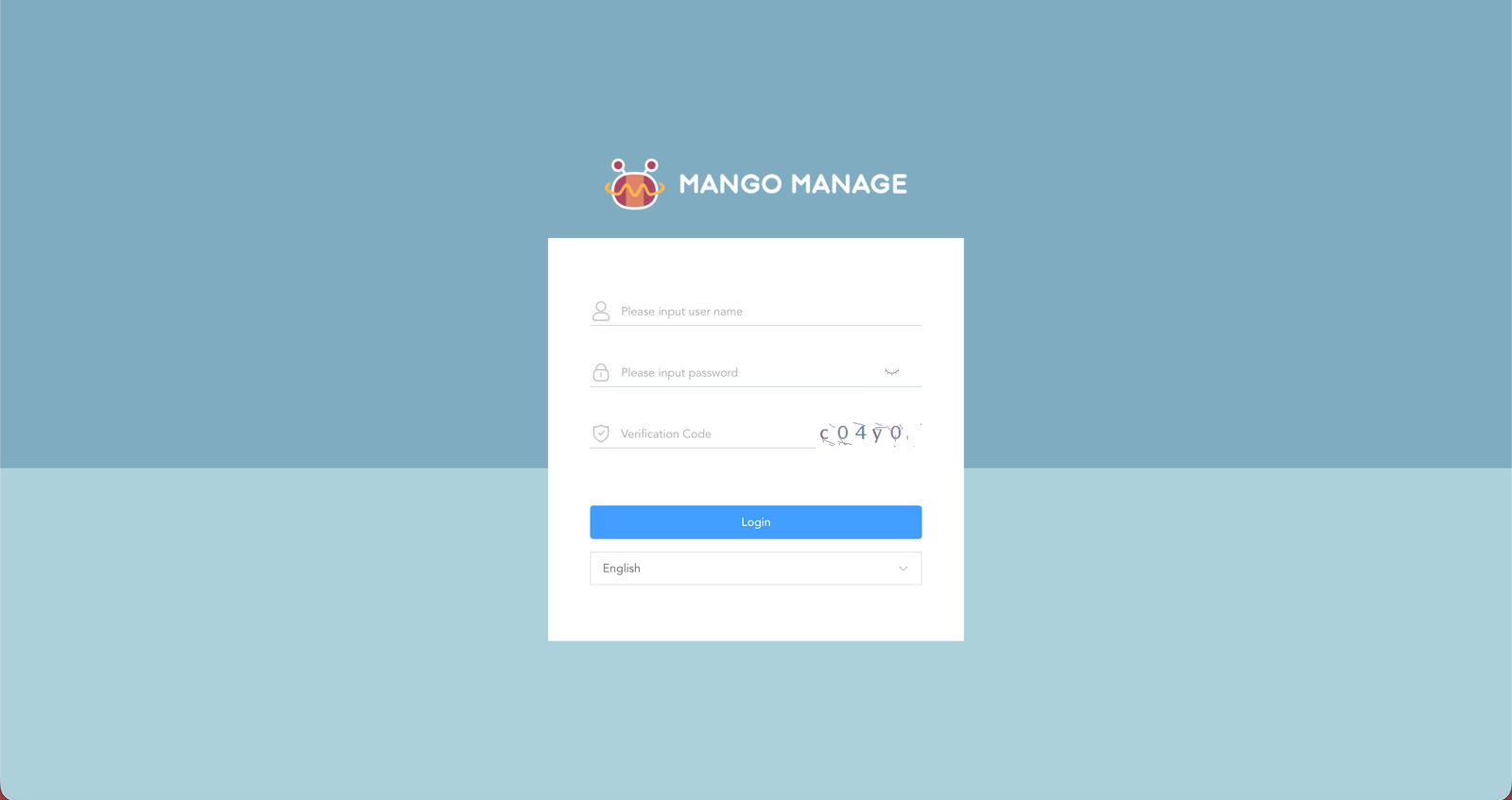
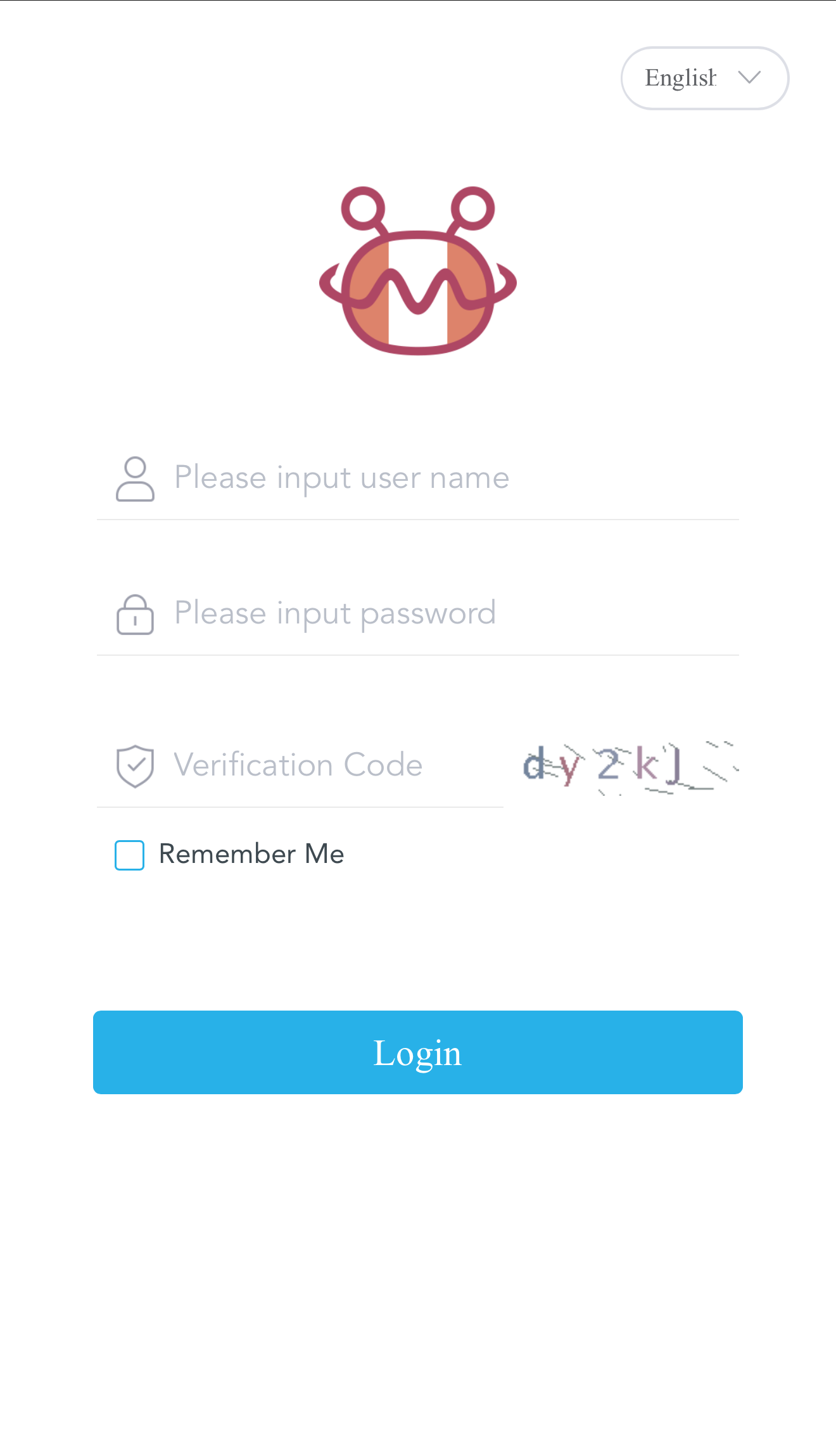
Open the panel, type your username (not your email), and your login password. Hit Login.
ManageMango login screen (desktop)
dashboard
5. The Dashboard Layout
3
What you see after login
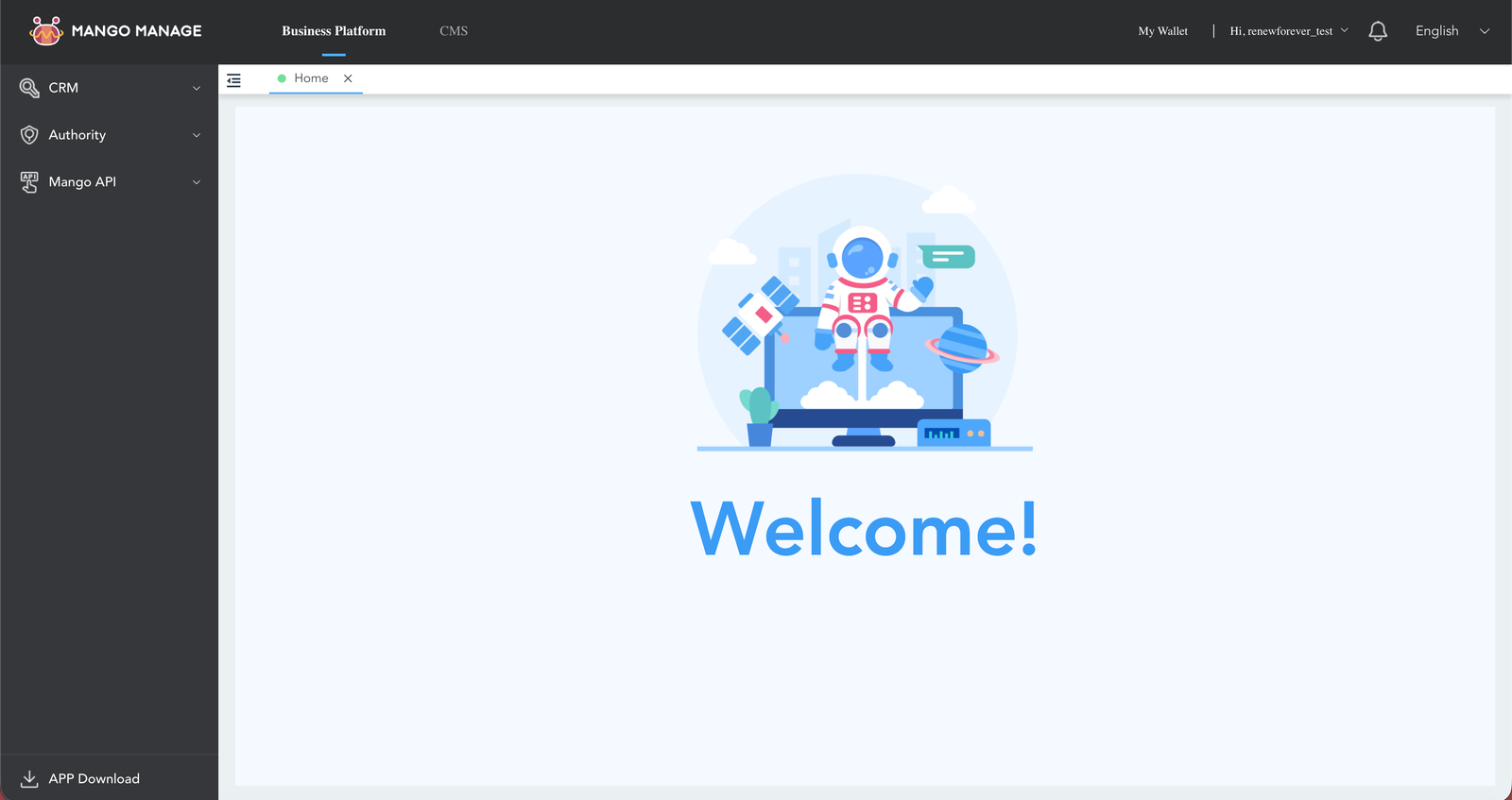
The panel has two top-level sections in the header: Business Platform and My Wallet. 99% of reseller work happens under My Wallet — that's the section you'll use.
Click My Wallet (top right) and the left sidebar switches to reseller mode with these groups:
Wallet — Wallet Details (balance + transactions), Payment Password, Order List, Code Exchange Record, Profits Record
Renew — Renew Box, Renew Netfly, Renew Nashare, Renew Mars
APP Download — QR codes + direct APK link for mobile
Dashboard — click "My Wallet" top-right to enter reseller mode
account_balance_wallet
6. Top Up Your Balance
4
Buying Mango coins
Top-ups are not self-service inside the panel. You pay @Renew_Forever on Telegram directly, I credit your ManageMango balance manually. Usually within a few hours during business hours.
Payment method
Rate
Notes
USDT (TRC20 / BEP20)
1 Mango = 1 USDT
Preferred. Fastest, no conversion loss.
Binance Pay
1 Mango = 1 USD
Near-instant if you already have a Binance account.
Minimum first top-up: $50 USD (= 50 Mango). No exceptions for the first buy — this covers account setup time and keeps small bulk-renewal volume viable. After that, top up any amount.
autorenew
7. Renew a Device — The Main Flow
5
Step 1 — Go to My Wallet → Renew → pick the product type
In the left sidebar under Renew, you'll see four options — that's the full list:
Renew Box — Mango boxes, Stream Stick, TV Stick, TV+Stream, VIP Package, Data Stick, 51.5E-SPORT
Renew Mars
Renew Netfly
Renew Nashare
Pick the one matching the buyer's device.
Not sure which type? A 12-character hex serial containing letters a–f → Nashare. 12-digit numeric → Box. MARS and Netfly use their own serial formats. When in doubt, use the RENEW-FOREVER device check first — it auto-detects the type.
6
Step 2 — Paste the SN or Account/UNID and click Query
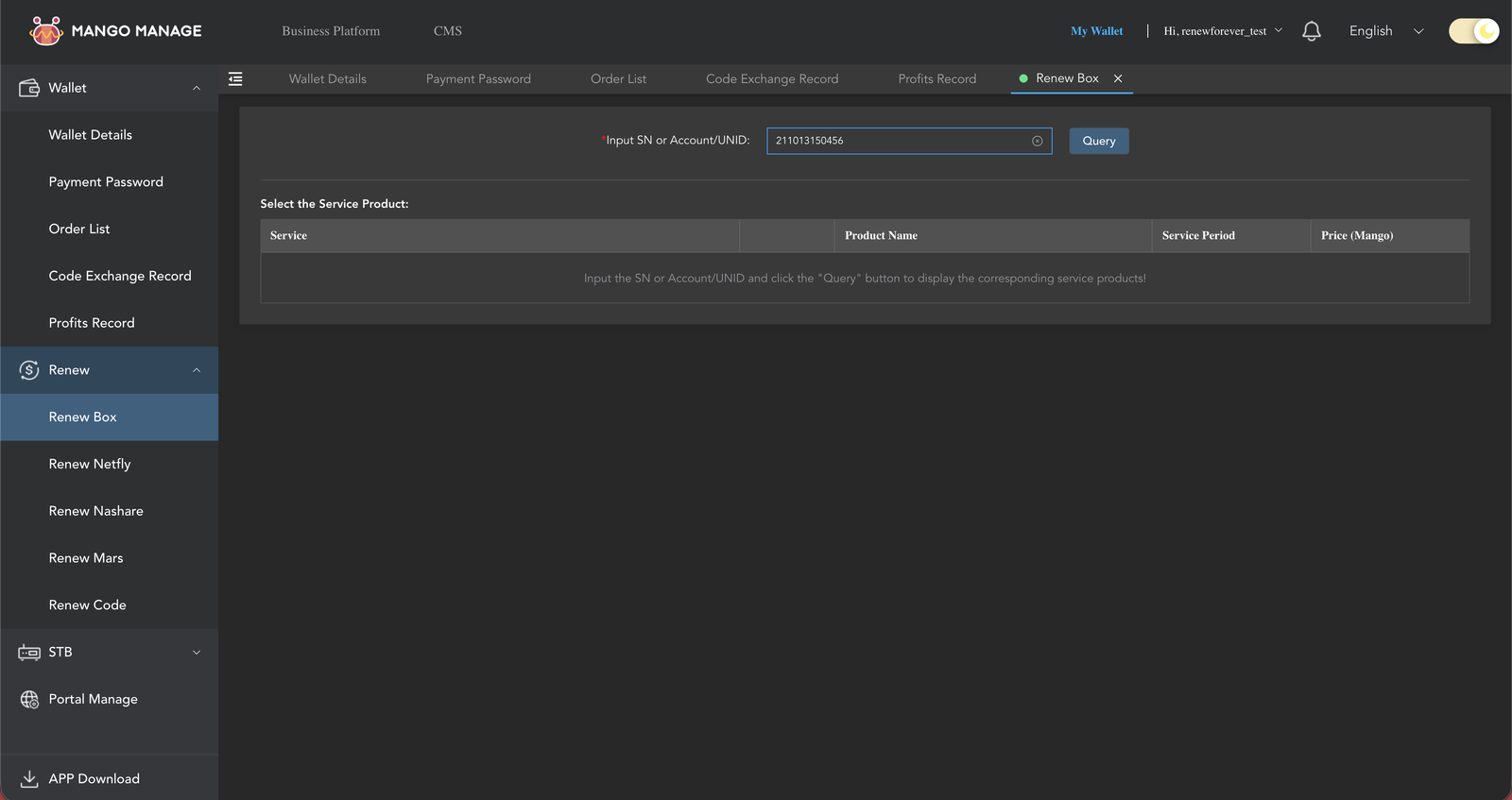
A single input field asks for SN or Account/UNID. Paste the buyer's serial and click Query. The panel looks up the device and returns the current expiry for every service it supports plus all available plans.
No verification code needed here. (The 4-digit verification code you may have seen elsewhere on the panel — CRM → Charging, or STB Software firmware download — is for those specific pages only. Renewals don't need it.)
Renew Box — SN query field before plan selection
Triple-check the serial. A single wrong digit renews someone else's device. Cancellations are free only in the first 30 minutes (see section 11) — after that, proportional Mango is burned. Slow down on step 2.
7
Step 3 — Pick the plan from the table, scroll down, Submit
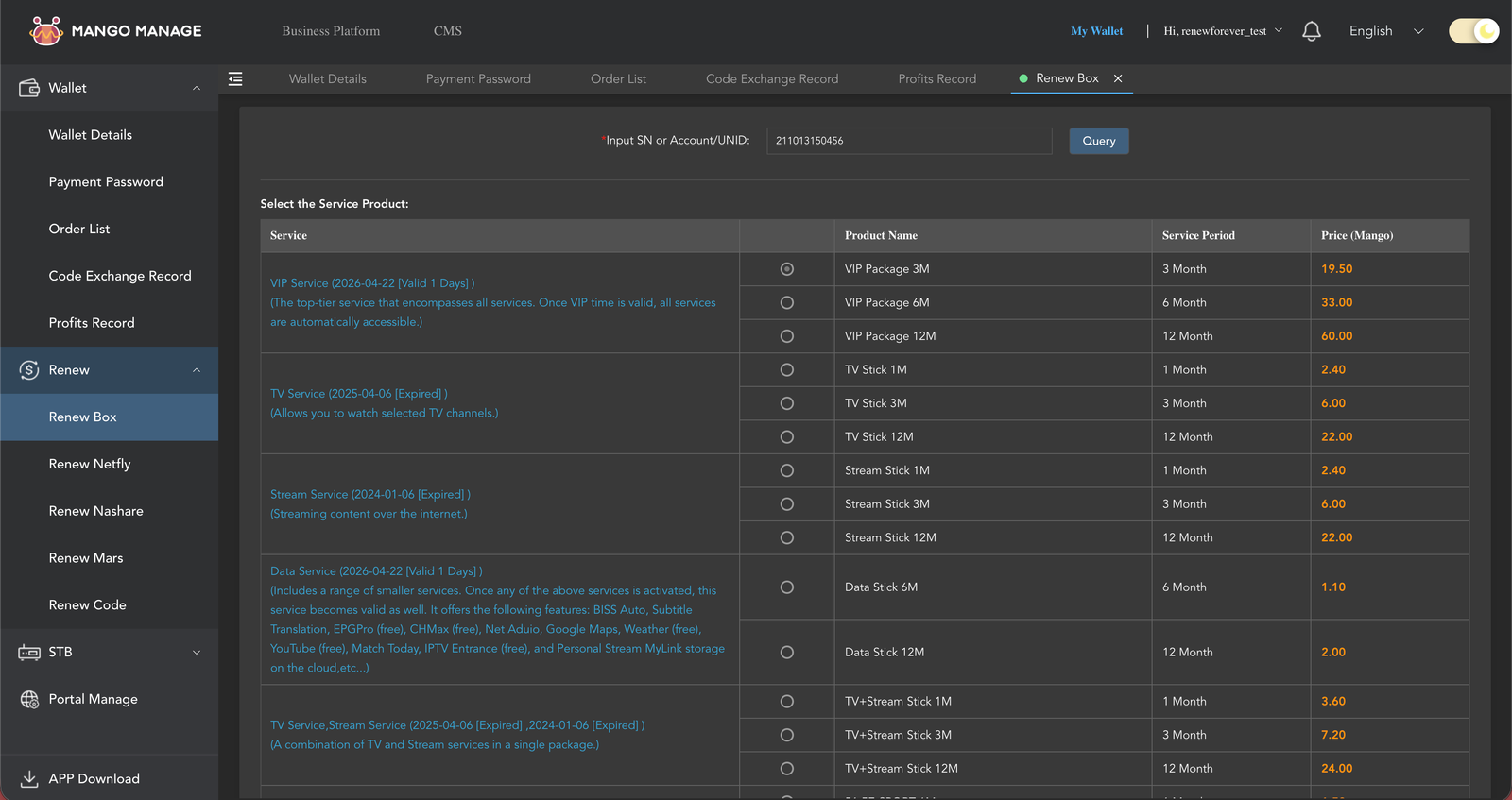
You'll see a table grouped by service. For a Box device you might see rows like:
VIP Service — top-tier, covers all services. VIP Package 3M (19.50 Mango), 6M, 12M
TV Service — TV channels only. TV Stick 1M / 3M / 12M
Data Service — small extras (BISS Auto, EPG, subtitles, etc)
CAS Service (51.5E-SPORT) — English sports channels for East Africa
Each row shows the service period and the Mango price. Click the radio button next to the plan the buyer paid for, scroll to the bottom, click Submit.
Plan picker after Query — grouped by service (VIP / TV / Stream / combo / Data / CAS)
8
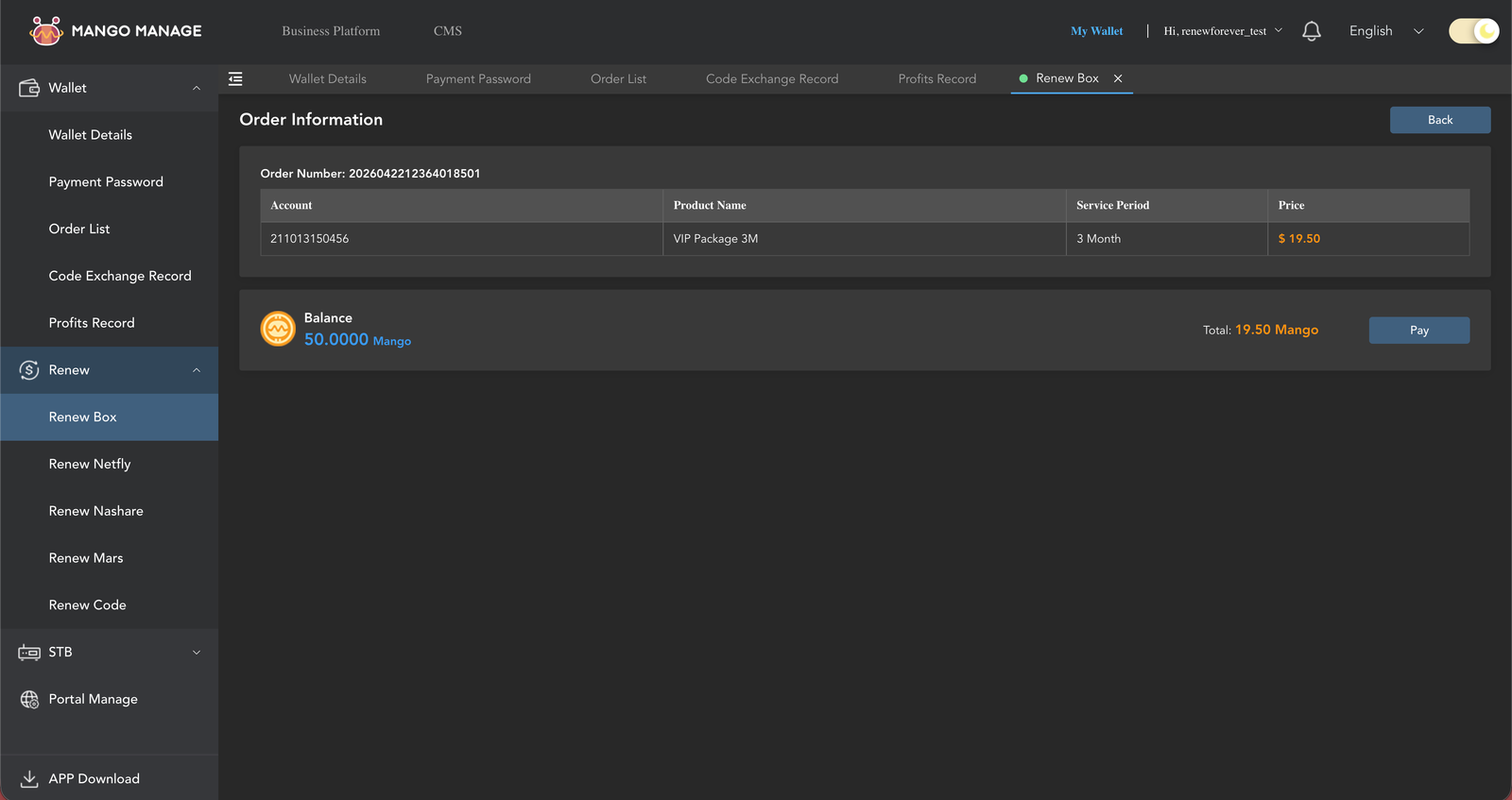
Step 4 — Review Order Information, click Pay, type the 6-digit PIN
Submit takes you to Order Information — a review screen showing Order Number, Account (the serial), Product Name, Service Period, and Price. The "Balance" row beneath shows your current Mango and the Total to be deducted. Click Pay.
Order Information — review screen with Balance and Pay button
A 6-digit PIN prompt appears ("Please input the payment password"). Type your 6 digits — the prompt auto-submits on the 6th digit, there's no OK button to click. If successful, you'll immediately see the receipt screen with the exact deducted amount in red, a ✅ "Payment Successful!" message, Transaction Number, Account, Product Name, Amount, Network Fee, and Date.
Receipt — deducted amount, transaction number, date
pin
8. The 6-Digit Payment Password
lock
You'll type it every time you spend or transfer Mango
ManageMango uses two separate passwords:
Login password — what you type at managemango.org or the mobile app to get in. You chose this (and I created the account with it).
Payment password — a 6-digit numeric code. Required every single time you renew, activate, or transfer Mango. Never cached.
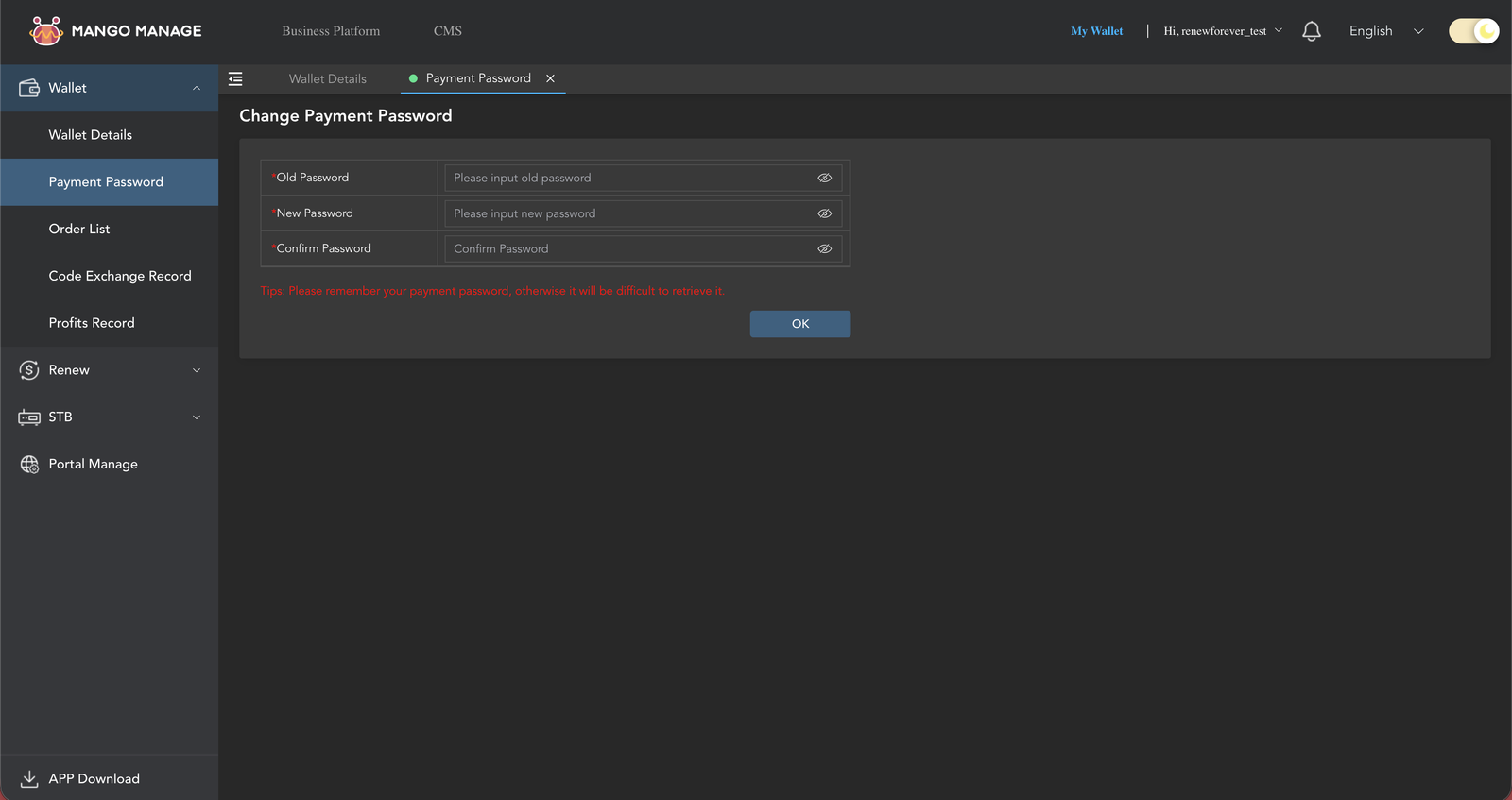
Where you set it: the very first time you click anything under My Wallet, a modal titled "Set Payment Password" pops up and forces you to create it before you can use the wallet. You can also set or change it manually via My Wallet → Wallet → Payment Password in the left sidebar. Type 6 digits into "Set Password", retype into "Confirm Password", click OK. You'll see "Operation Successfully" — done.
Payment Password setup form — note the red "difficult to retrieve" warning
How it looks at pay time: when you click Pay on a renewal, a small modal with six square PIN boxes appears. Type your 6 digits. The prompt auto-submits on the 6th digit — you don't click OK. If wrong, the fields just clear and you retype. Nothing is charged on a failed attempt.
6-digit PIN prompt — auto-submits on 6th digit, shown on every renewal
The payment password cannot be recovered. Not by you, not by me, not by ManageMango support. The panel itself warns: "Please remember your payment password, otherwise it will be difficult to retrieve it."If you forget it, the balance in the account is effectively frozen. Write it down somewhere safe (password manager, physical notebook) the moment you set it.
Why it's annoying and why it's actually good: yes, typing 6 digits on every renewal slows you down. But it means even if someone steals your login session (stolen laptop, phished cookie), they still can't spend your balance. The 6-digit prompt is the last line of defence.
Never share the payment password — not with "support", not with anyone. If someone asks for it, they're trying to steal your coins.
search
9. Check a Device Without Renewing
9
Lookup-only — no credit deducted, but you need a balance
Paste the serial and the panel fetches the current expiry and services. The lookup itself is free — no Mango is deducted. However, ManageMango requires at least 1 Mango in your wallet before it'll let you run a check. That's a floor, not a charge; your balance doesn't drop.
Balance below 1 Mango? The check button is disabled. Top up (minimum $50 first buy — see section 7), or use our free device-check below that doesn't need a panel login.
Public device check — no login, no balance required:renew-forever.com/check-your-device — auto-detects the device type and returns expiry + available plans. Share this link with buyers too.
receipt_long
10. Order List & Cancelling a Subscription
11
Where to find it
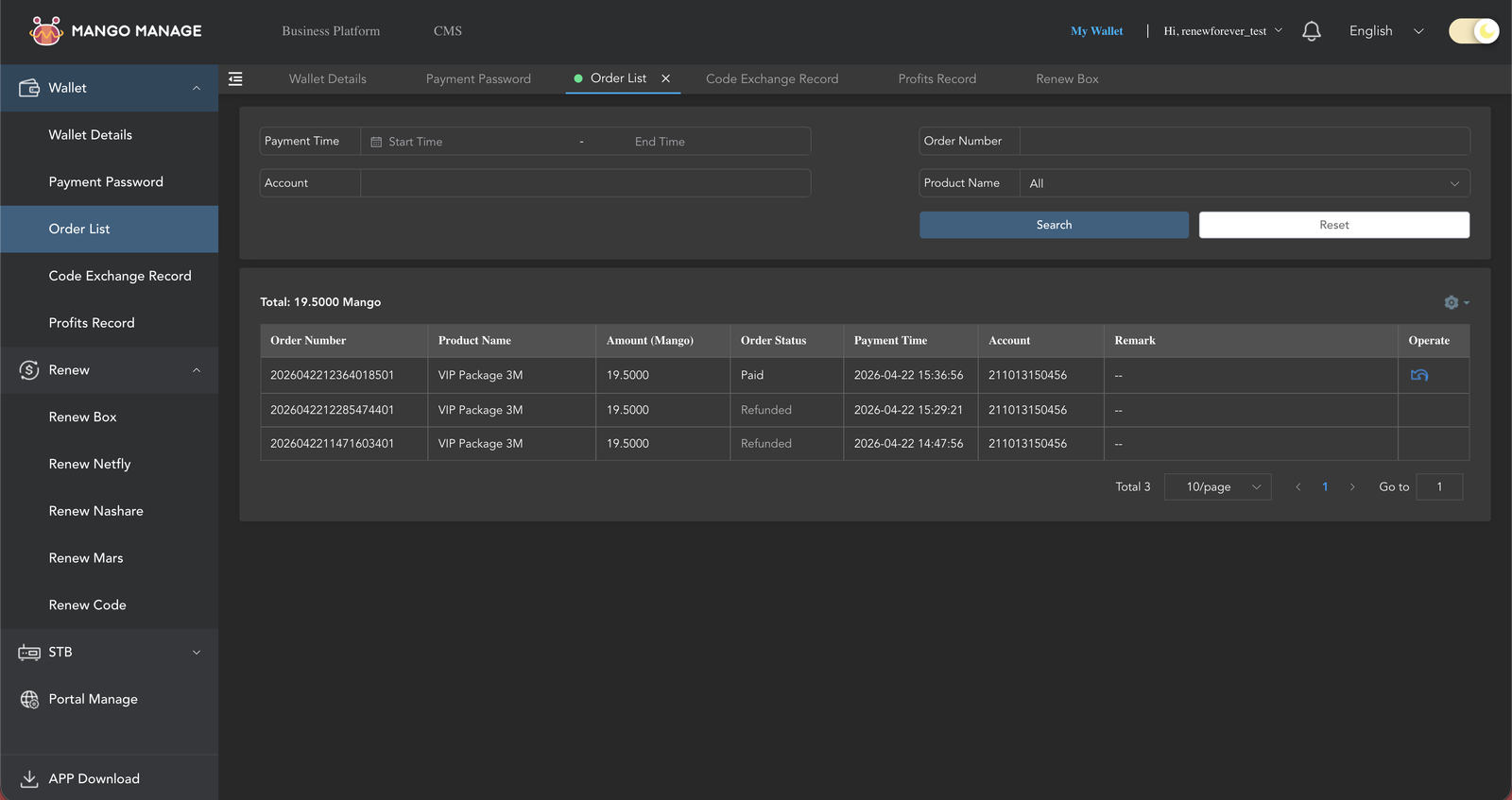
My Wallet → Order List in the sidebar. The page lists every renewal you've done with columns: Order Number, Product Name, Amount (Mango), Order Status, Payment Time, and Operate. A running total at the top shows the total Mango value of all your orders.
The Operate column contains a small cancel icon on every order that's still within the 5-day cancel window and hasn't already been refunded. Refunded orders show Refunded in the Status column and the Operate icon disappears.
Order List page — each row with a cancel icon under Operate
12
Cancel rules — confirmed from the panel itself
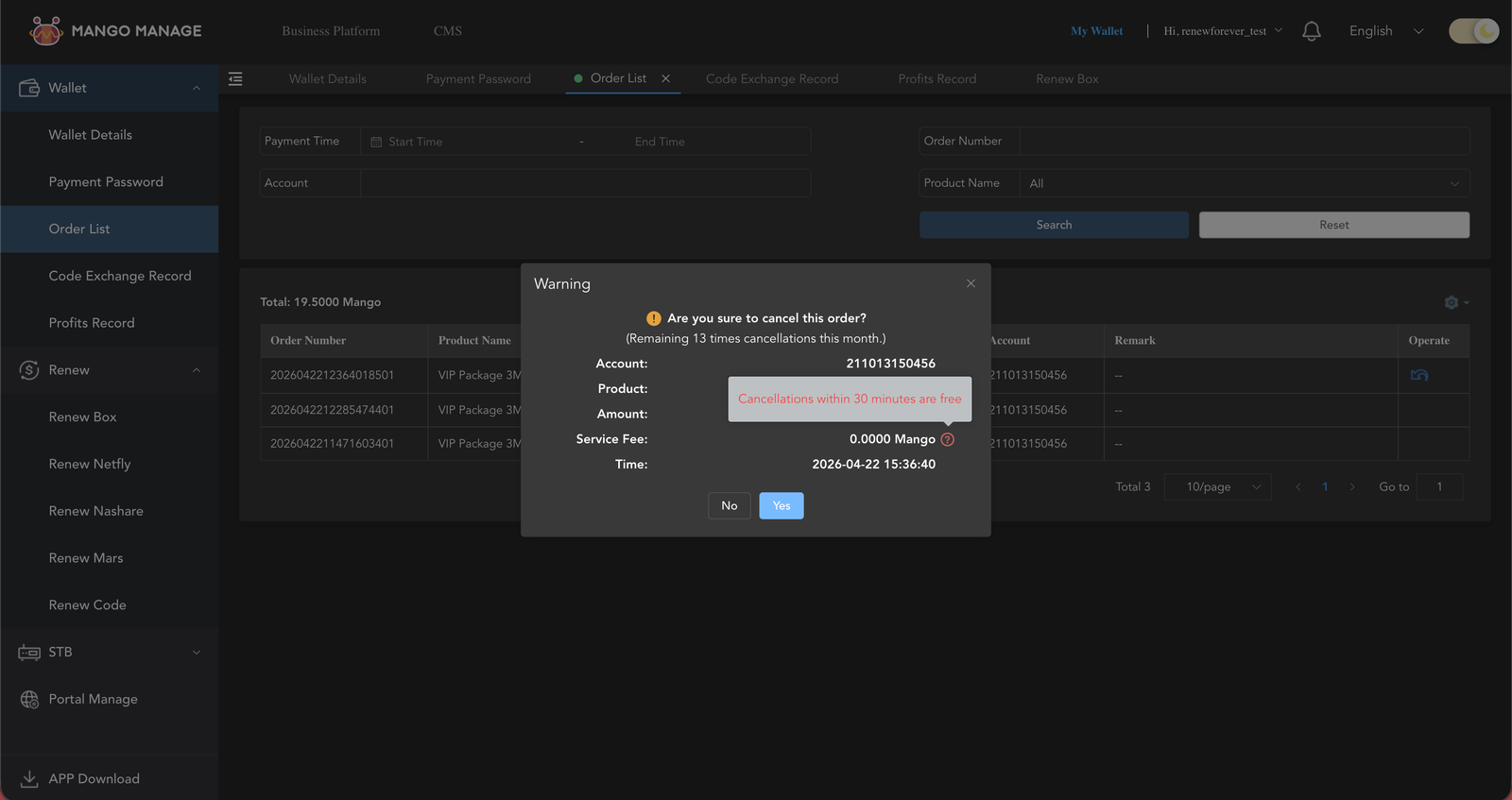
When you click the cancel icon, a Warning dialog appears showing: Account, Product, Amount, Service Fee, Time, plus a count like "Remaining 15 times cancellations this month." Hovering the ? next to the Service Fee reveals the rule in plain text: "Cancellations within 30 minutes are free."
Full rules:
Within 5 days of the subscription only. Day 6 onwards, the Operate icon is gone.
Maximum 15 cancellations per month, across all renewals. The Warning dialog shows your remaining count live. Hit the cap and you're blocked until the 1st of next month.
Free (full Mango refunded, Service Fee = 0) if you cancel within the first 30 minutes of the subscription.
After 30 minutes, ManageMango keeps a portion proportional to the time elapsed — the longer the subscription has been active, the less you get back. A cancel on day 4 returns very little.
Click Yes and the refund is instant — the Order Status flips to Refunded, the Operate icon disappears, and the Mango comes back into your wallet. You'll see the refund as a separate Income row in Wallet Details.
Warning dialog — "Remaining 15 times cancellations this month" + free-if-under-30-min tooltip
The 15 cap resets on the 1st, not a rolling 30 days. If you burn all 15 cancels early in the month, you're stuck for the rest of it — no exceptions.
The 30-minute rule is your safety net. If a buyer sends the wrong serial or you picked the wrong plan, cancel immediately — under 30 minutes it's free. Don't wait to "see if the buyer complains."
trending_up
11. Profits Settlement — Monthly Bonus on Every Renewal
13
How the bonus works
Every renewal you do earns a Mango bounce (a small rebate) scaled to the renewal's Mango price. The panel accrues these bounces through the month, then pays them out automatically:
Settled on the 5th of every month, credited to your wallet.
You must hit a monthly minimum to qualify — these are the Profits Settlement Standards:
Reseller account: 5 Mango minimum accrued
Sub-Dealer account: 120 Mango minimum accrued
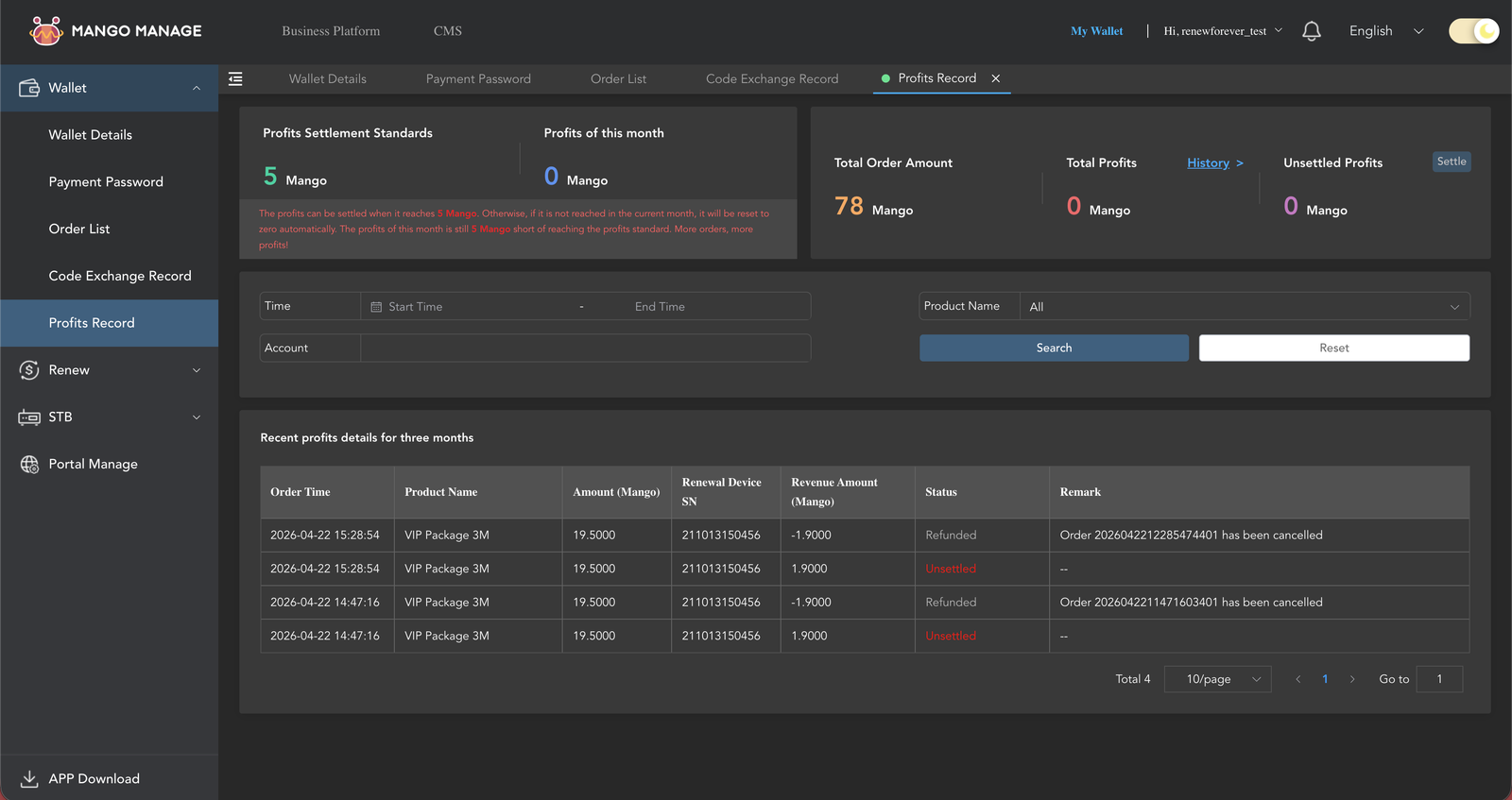
If you don't reach the minimum that month → your profits reset to zero. They do not carry forward. The panel shows this in red directly on the Profits Record page: "Otherwise, if it is not reached in the current month, it will be reset to zero automatically."
Profits Settlement Standards page — monthly accrual and per-renewal bonuses
On the Profits Record page (under My Wallet) you can see, live:
Profits Settlement Standards — your tier's minimum (5 Mango for reseller, 120 for sub-dealer)
Profits of this month — what you've accrued so far, and how far you are from the threshold (the panel tells you literally: "The profits of this month is still X Mango short of reaching the profits standard. More orders, more profits!")
Total Order Amount / Total Profits — lifetime counters, with a History link
Unsettled Profits — amount waiting for the next 5th with a Settle button
Recent profits details for three months — a table showing Order Time, Product Name, Amount, Renewal Device SN, Revenue Amount, and Status per renewal
Hit the threshold every month or lose the bounce. Because unreached profits reset, a slow month means zero bonus — the rewards are structured to keep volume steady. Reseller accounts only need 5 Mango per month (about 1 VIP Package 12M's worth of bounce), so for most active sellers this is easy to clear.
account_balance_wallet
12. My Wallet — Balance & Transaction History
14
One page, two things
The My Wallet page shows:
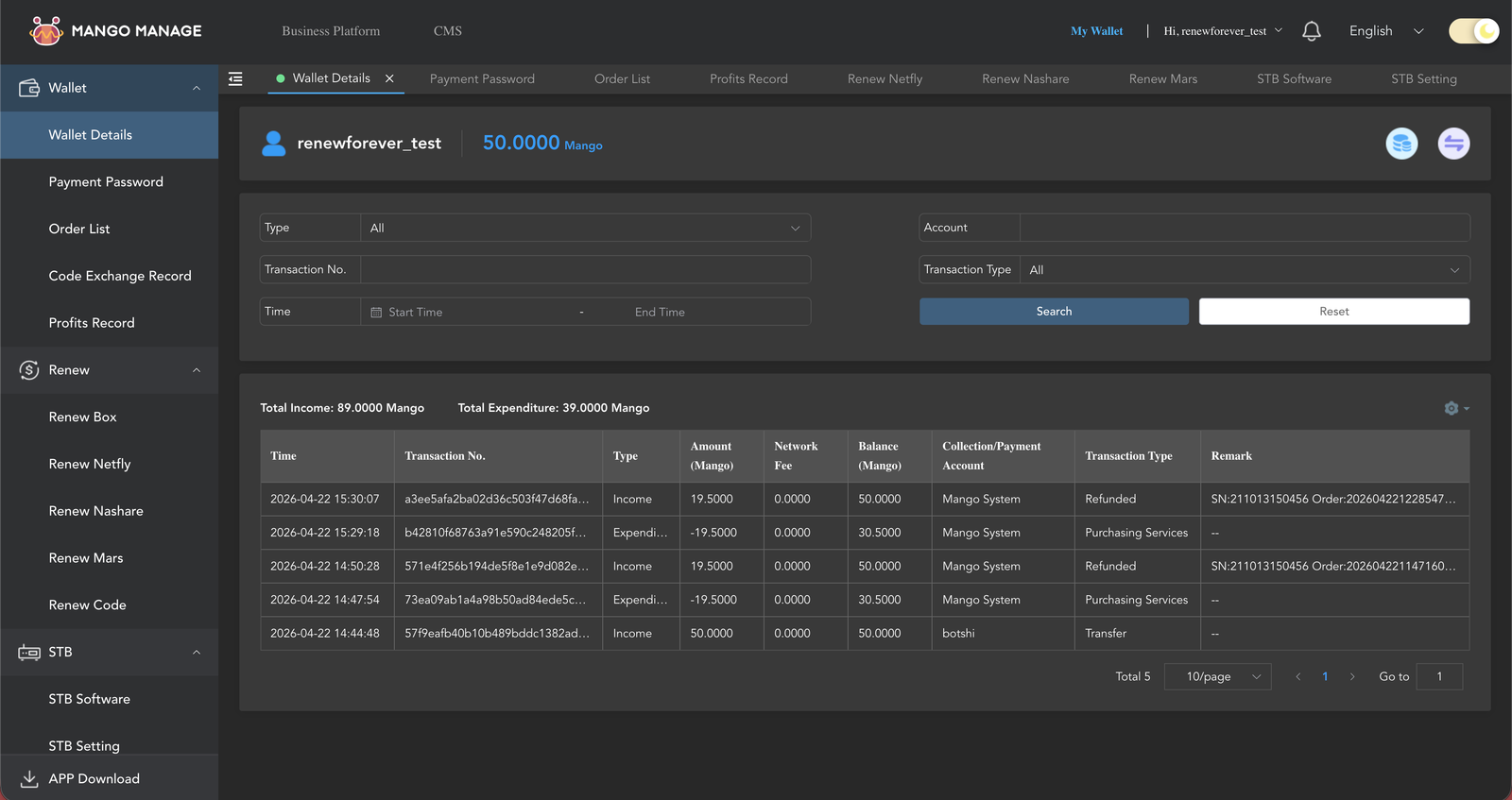
Your current Mango balance — the big number at the top.
Your full transaction history — every credit (top-ups I sent you, monthly Profits Settlement payouts, cancellation refunds) and every debit (renewals, transfers). Date, type, amount, running balance.
My Wallet page — balance at top, transaction log below
Use My Wallet to reconcile, use Order List to act. My Wallet is the financial ledger (how much did I spend this month, what did my Profits Settlement actually pay out?). Order List is where you cancel, look up a transaction number, or check a past subscription's expiry.
smartphone
13. The Mobile App & APK
11
Get the official download links from inside the panel
In the left sidebar, click APP Download. A modal opens with official links + QR codes for every mobile surface. From a logged-in desktop session, scan the QR on your phone — it's the fastest way to install.
Two surfaces matter for sellers:
Payment App (Mobile) — Android APK (MangoPay.apk), direct link appstore.metamango.org/download/MangoPay.apk
Payment H5 — the mobile web PWA at app.wallet.metamango.org (works on Android, iOS, anything with a browser)
The APP Download modal also lists Dates+ STB, Youflix, and ClashPro — those are the app-store side apps for end customers, not reseller tools. Ignore them for panel work.
APP Download modal — QR codes + direct URLs for Payment App and Payment H5
15
Option A — Install the PWA from your browser (simplest, works on iOS)
Open app.wallet.metamango.org in Chrome (Android) or Safari (iOS).
Android / Chrome: tap the three-dot menu → Install app / Add to Home screen.
iOS / Safari: tap Share → Add to Home Screen.
An icon appears on your home screen. It launches the panel in full-screen like a native app.
Mobile PWA home screen
12
Option B — The Android APK ("MangoPay")
There is a native Android build distributed outside the Play Store. The official download link is published inside the panel (My Wallet → APP Download in the sidebar), along with a QR code for scanning from your phone:
When prompted, allow Install unknown apps for your browser.
Open the downloaded file and install.
Open the app, enter the same username + password you use on desktop.
You'll be prompted for your 6-digit payment password the first time you renew.
iOS has no APK. iPhone sellers use the PWA (Option A) only — app.wallet.metamango.org works identically on iOS Safari.
Only use the official link above — other sites distributing "MangoPay APK" sometimes host tampered builds. The link from inside your own logged-in panel is always the safe one.
These four are the only renewal options in the panel. Anything else (Viark, Viart, Apollo IPTV, Forever IKS / TV Code, software renewals, etc.) is not sold through ManageMango — those buyers go through the RENEW-FOREVER marketplace matched to a specialist seller, or through our main checkout.
build
15. Troubleshooting — Common Errors
"Invalid serial" / "Device not found"
You picked the wrong product type for the serial. Nashare serials are 12-char hex (0–9 + a–f); Mango serials are 12-digit numeric; MARS uses its own Box ID format. Double-check what the buyer sent, and make sure you didn't paste a trailing space or letter O instead of zero.
"Wrong payment password"
The 6-digit payment password is prompted on every single renewal, transfer, and wallet action — it's never cached. Double-check you're typing the digits you set on first login, not your login password. If you've forgotten it, see the next FAQ.
"Insufficient balance"
Your Mango balance is lower than the plan cost, or below the 1-Mango floor required even for lookup checks. Top up (USDT or Binance Pay only, $50 minimum first buy — see section 7) and try again. Balance is visible on the dashboard home and on My Wallet.
"Cancel not available" on an order
Three possible reasons: (1) the subscription is older than 5 days, (2) you've used all 15 of your monthly cancellations, or (3) the cancel button didn't render due to a stale page — hard-refresh first.
"The serial was right but the buyer's device still shows expired"
Device firmware caches expiry data. Ask the buyer to: (1) power-cycle the box, (2) on the box menu, look for Update / Refresh Subscription / Sync Time and hit it. Usually that's enough. If still expired after a reboot + sync, open a dispute on RENEW-FOREVER — we'll help trace the transaction.
"Forgot my login password"
No self-serve reset. Message @Renew_Forever on Telegram with your username — I'll reset your login password within a few hours.
"Forgot my 6-digit payment password"
This one I cannot fix. The 6-digit payment password is stored one-way on ManageMango — neither I, nor ManageMango support, nor you can retrieve or reset it. A forgotten payment password means the Mango balance in that account is permanently frozen. The only path forward is opening a new account and losing the balance on the old one. Write your 6-digit password down somewhere safe the moment you set it.
Session seems to time out after ~30–60 min of idle
Expected behavior. Just log in again. If you're doing bulk work, keep the tab active (a quick click every few minutes) to avoid being kicked.
support_agent
16. Support & Escalation
headset_mic
Reach me on Telegram
ManageMango has no built-in ticket system. For anything — account creation, top-ups, login-password resets, enabling a feature, billing questions, disputes — message me on Telegram. Either @Renew_Forever directly or the @renew_forever_chat group both work.
Hi! I can help you check your device, find sellers in your currency, look up firmware updates, or answer any question about the platform. How can I help?
Never miss a renewal
Enter your serial number and we'll email you 7 days and 1 day before your server expires.
Select services to track
We found 0 services on your device. Pick which ones to get reminders for.
Reminders set!
We'll email you before your server expires. No spam, unsubscribe anytime.